
Draft campaign detail (readiness + configuration)
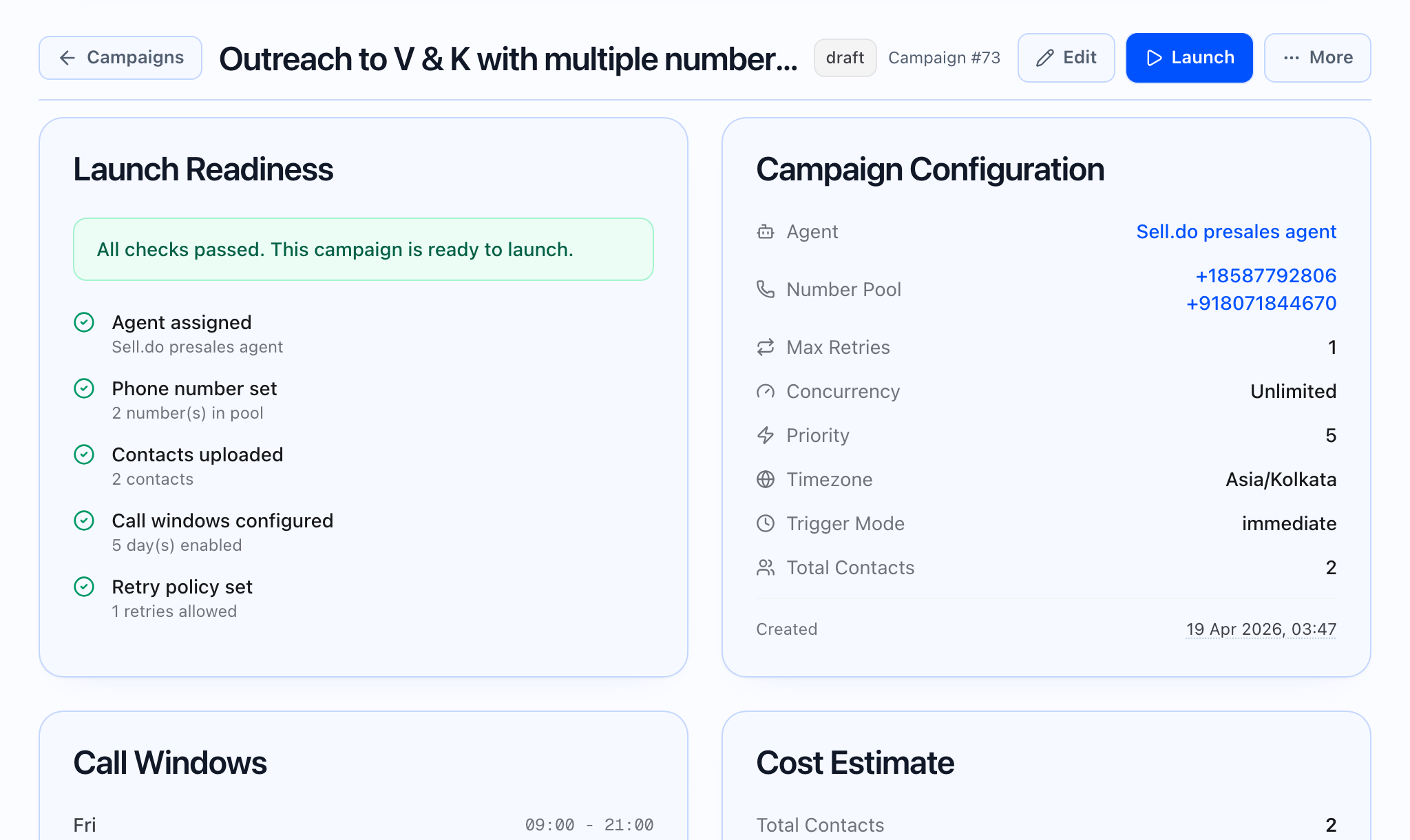
Draft campaigns use the draft layout: pre-launch checklist plus a read-only summary of settings and, when available, an audience preview. You do not see the live KPI strip or the full finished-campaign report here.
Launch Readiness (checklist labels)
The UI shows five rows, each pass or fail with optional detail text:
- Agent assigned — detail shows the agent name when present.
- Phone number set — passes if a number pool or a from number is configured; detail may show pool size or a full phone number in E.164.
- Contacts uploaded — passes if there is at least one contact or a staged CSV is linked. Detail may distinguish materialized contacts from a message that contacts will be created at launch.
- Call windows configured — passes if at least one day is enabled; detail shows how many days have windows.
- Retry policy set — passes when a retry count is set; detail shows how many retries are allowed.
When every row passes, a green banner reads: “All checks passed. This campaign is ready to launch.”
Campaign Configuration (fields shown)
The Campaign Configuration card lists:
- Agent (link when an agent is selected)
- Number Pool (each entry linked) or a single from number
- Max Retries
- Concurrency (a number or Unlimited)
- Priority
- Timezone
- Trigger Mode (labels use spaces, not internal codes)
- Total Contacts
- Created; Scheduled for when a schedule exists
Call Windows
If any days are enabled, a Call Windows card lists each enabled day with its time range.
Cost Estimate
The Cost Estimate card shows:
- Total Contacts
- Max Attempts per Contact — one plus the max retries
- Max Possible Calls — contacts times max attempts per contact
Campaign Goals
Campaign Goals uses any goals defined on the campaign. If none are set, the UI explains that and may show example goal types. When goals exist, each is labeled in plain language with its target. The draft card does not show a live progress bar — progress appears after launch when analytics include goal progress.
Audience preview (when available)
When the draft view has preview data, the app may show:
- Estimated Reachable Now — when timezone data exists: a rough count of contacts in a “business hours” style window, with percentage and per-timezone chips.
- Timezone Distribution — horizontal bars per timezone with counts.
- Top Companies — table: Company, Contacts.
- Tag Distribution — chips with tag and count.
- Country Distribution — chips with country and count.
If preview data is missing, those cards do not appear.
Staged CSV and number pool health
- Staged CSV: when a CSV upload is linked, an extra CSV upload section can appear below the main draft content.
- Number pool health: a table can appear when the campaign uses multiple numbers: number, provider, status, attempts, answered, answer rate, weight.
Actions (header)
For drafts, actions typically include Edit (opens the campaign builder for this campaign) and Launch (starts the campaign). Clone, export, and similar options usually apply to other statuses; exact items follow status rules in the app.
If readiness is incomplete, fix blockers before launch. A staged CSV can mark “contacts uploaded” before tasks exist—confirm task counts and preview distributions when available.